


If you like to use ListBox to display some data, you have already needed to show more than one column.
To do that, you can use Canvas to paint anything into ListBox line. The thing is, how to organize all columns and allow user to reorder, resize, hide/show columns.
There is an option to implement all this functionalities by your self. That’s cool but takes a lot of time and you need to do that every single ListBox you need columns.
Assuming that, if you are like me, you gonna to this implementation only when you really need this functionalities, Otherwise, if it’s a simple ListBox, not worth the effort.
So, why don’t you use a component to do that?
Let me introduce the DzListHeader control:
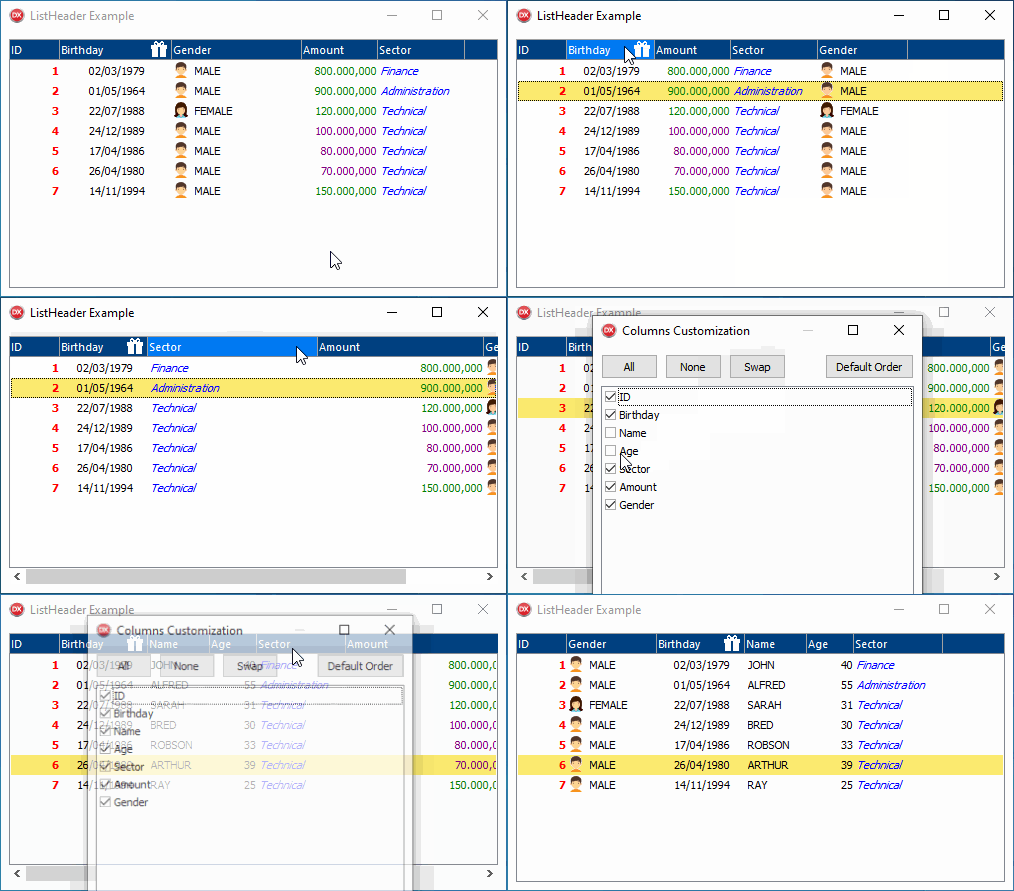
To use the control, just insert it on the form, and then insert a ListBox inside the DzListHeader control.
The component allows you to draw columns quickly and easy in the correct position, by using column bounds.
Also there is a Customization dialog, allowing user to show/hide columns easily.
Read full documentation at GitHub: https://github.com/digao-dalpiaz/DzListHeader
Please, leave your comment. Do you use ListBox to show data using more than one column? How do you do this today?